

This type of notification offered by Oracle JD Edwards allows companies to:
- Improve your efficiency by being proactive and actionable
- Provide relevant information about business events in real-time, without the need for the user to be online, allowing them to provide an in-the-moment response
We tell you all about JDE notifications, and how you can get the most out of them.
Proactive notifications
Proactive notifications allow the system to notify users of business events as they occur, without the need to be constantly connected to JDE. These notifications can be delivered in a variety of ways:
Browser pop-up messages
Users can receive instant notifications in their web browsers when a relevant event occurs.
Work center
Notifications can appear in the JDE Job Center, where users can view them and take action.
Notifications can also be sent via email, ensuring that users are informed even when they are not in the app.
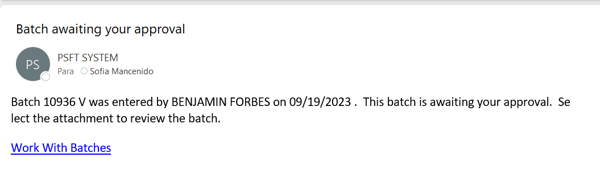
Email to SMS
For added convenience, notifications can also be delivered via text message (SMS) via email.
In addition, as of version 9.2.3, users can see these notifications in the “Message Center” and on the “My To-Do List” page of JDE, making it even easier to keep track of important events.
Customizable notifications
Notifications in JD Edwards are highly customizable, which means you can tailor them to your specific business needs.
This is achieved by incorporating rules that determine when a notification message should be sent to users. In addition, you have full control over the input data that notifications use, such as Watchlist counts or data collected through orchestrations.
You have the freedom to define this input data and, if necessary, assign it default values. You can also allow users to override these defaults to receive notifications more specific to their individual needs. For example, you could create a notification to alert when a customer exceeds their credit limit and allow users to identify specific customers they want to monitor closely.
You can use variables and shortcuts in the notification message to provide more specific information to users and give them direct access to a relevant app, allowing them to quickly respond to the information they receive.
Notification messages
When generating a notification, you have the option to decide whether it should be unique for each user or if a uniform message for all users meets your business needs. This flexibility allows you to tailor notifications to your company’s organizational structure and communication preferences.
Types of notifications
JDE offers three types of notifications, and all of them are created using the Orchestrator Studio tool:
Simple Notification
These notifications provide a way to send reminders or updates and include app shortcuts in the notification message. This type of message is not dependent on any business events linked to the data in JD Edwards.
Watchlist-based notification
Watchlist-based notifications allow you to use existing Watchlists to send notification messages that include threshold values, counts, and app shortcuts to users.
Orchestration-based Notification
Orchestration-based notifications allow you to use all the functionality available in an orchestration and proactively deliver the data to users in a notification message.
Using schedulers
A key aspect of notifications is the use of schedulers. A scheduler defines how often the system executes a notification.
You can define it in:
- Minutes
- Hours
- Days
- Using a Cron string (for example, every Tuesday at 2:00 pm).
This schedule is then attached to a notification to determine the execution frequency. The same scheduler can be attached to multiple notifications.
Schedulers are managed as User-Defined Objects (UDOs), which means you can publish and share them for others to use and use schedulers that others have published.
Workflows
This functionality, associated with notifications, allows users to access messages or tasks from multiple locations, including the Work Center , Employee Queue Manager , and external email systems.
The main characteristics are the following:
Easy integration
One of the most prominent advantages is the ability to integrate any application, report, or event within an application into the flow without the need to make major changes to the system infrastructure, giving you precise control over how workflow processes are triggered.
Multiple approvals
It gives you the possibility of approvals at multiple levels, making it easier to manage complex processes.
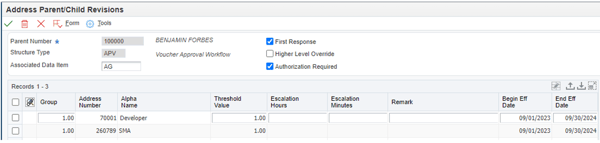
Automatic and manual scaling
The tool allows you to automatically escalate unattended messages, as well as manually, allowing an administrator to take control and execute changes to the workflow as needed.
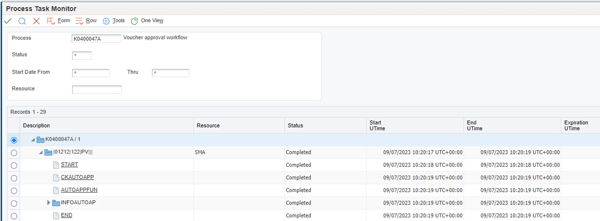
Process Task Monitor
The administrator can monitor the flow, tracking the progress of the processes and identifying delays and intervening, overriding the execution of certain tasks to solve problems or avoid blockages.
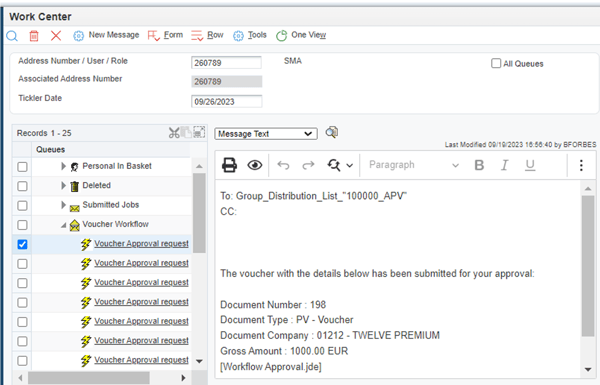
Access to-dos
Action messages or errors that require user interaction are displayed in the Work Center. For example, if a user receives a notification that a document needs review, the document path will appear here. This way, users can take action and perform assigned tasks directly from the Work Center, streamlining workflow collaboration.
Principles
Workflows are based on two key principles, which are routes and rules.
- Paths: They define the path along which the work moves, which may involve a message, the execution of a report, a business function, etc. Paths can be simple and sequential or complex, involving joins or divisions, parallel or iterative paths.
- Rules: They define who or where the work should be sent. They set the conditions that must be met for the flow to progress. They can depend on a predefined threshold value or simply advance to the next step in the process.
Components
Workflows have two components, which are tasks and transitions.
- Tasks: They represent the actions that take place in a workflow process. These actions can be varied and range from the beginning of the process to the sending of an approval message or the update of a table in a database, and can be performed by users or automatically by the system. For example, in the credit limit approval flow to a customer, the initial task will be the modification of the credit limit by an employee. The system will then invoke the task of sending a message to the approver of this change, who, in turn, if he decides to approve it, triggers the task of updating the database with the new limit.
- Transitions: Transitions are the links that connect the tasks in a workflow process. These connections define the workflow and how the process moves from one task to another. Transitions can contain transition conditions, which are logical criteria that determine which task will occur next in the workflow process. Continuing with the credit limit example, the transition from the Start Task to the Message Task could be conditioned by the modification of the customer’s credit limit. If the credit limit was modified in a certain range, this transition will be triggered.
In short, notifications in JDE are a powerful tool that allows businesses to stay informed and make faster, more efficient decisions. Customization, flexibility, and the ability to automate business processes make notifications an integral part of modern business management. Take advantage of these tools to keep your team up to date and ready to act on key events in your business.