
What is Oracle Autonomous Database and its deployment types?
Oracle Autonomous Database is the first fully autonomous database system, available to everyone in the OCI public cloud, and offers:
- Patches.
- Updates.
- And, automated adjustments.
All routine database maintenance tasks are performed without any human intervention and without “Downtime”!!
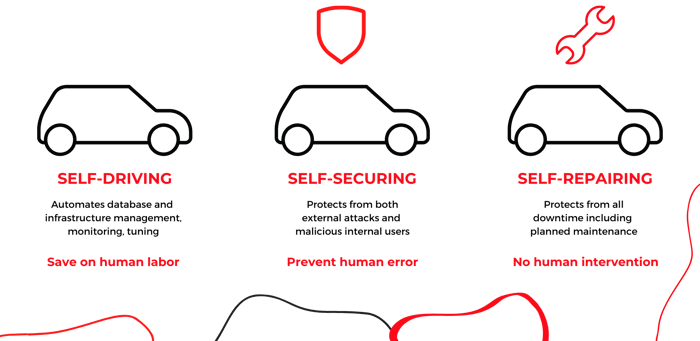
Autonomous Database on Oracle Cloud Infrastructure is autonomous, self-protected, and self-healing, eliminating manual database management and human error.
Oracle Autonomous Database is fully elastic; simply specify in OCI the number of OCPUs and the TB storage capacity for the database.
At any time, you can scale up or down OCPUs or storage capacity with a simple click.
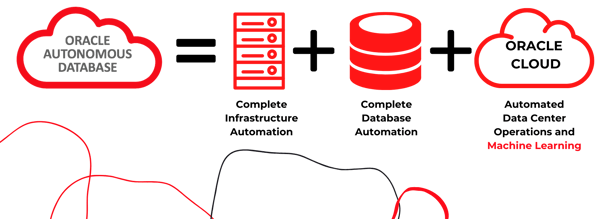
Oracle Autonomous Database provides a level of performance and reliability that manually managed databases can’t.
Compared to a manually managed database, the autonomous database:
- it costs less to maintain
- Provides higher availability
- Reduce human error
- And, it’s safer
They therefore mean HIGHER PERFORMANCE.
Oracle JD Edwards customers can leverage Oracle Autonomous Database capabilities and realize significant business benefits.
Oracle Autonomous Database is available through two deployment options:
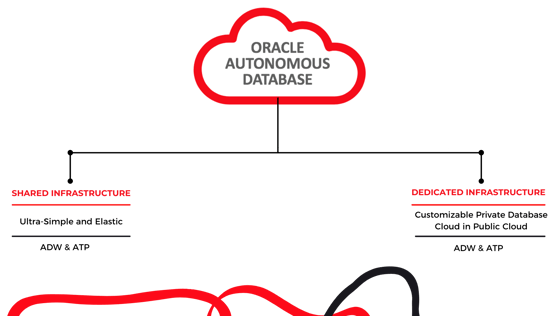
Exadata Dedicated Infrastructure
Exadata’s dedicated infrastructure provides a private database cloud in the public cloud.
It is ideal for achieving the highest degree of security and governance and provides a complete self-service database experience. It provides complete isolation for a single customer and the ability to customize operational policies to align autonomous operations with application lifecycles.
Exadata Shared Infrastructure
Exadata’s shared infrastructure option provides a simple, elastic database with capacity placement and management operations fully managed by Oracle.
Exadata’s infrastructure is shared with other cloud customers.
ADB is now compatible with JD Edwards Enterprise One!
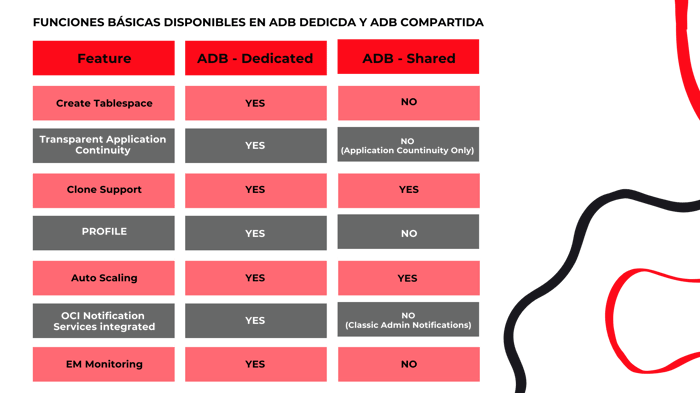
Currently, Oracle JD Edwards only supports Oracle Autonomous Database on Exadata’s dedicated infrastructure, allowing you to provision autonomous databases on your own Exadata dedicated cloud infrastructure, rather than on an infrastructure shared with other OCI customers.
With this service, you have the complete Exadata hardware at your disposal. The Oracle Autonomous Database dedicated service uses the Autonomous Exadata Infrastructure that offers a multi-tenant database architecture, allowing you to create and manage multiple autonomous databases within a single database system.
What are the components of Oracle Autonomous Database in Exadata’s dedicated infrastructure?
- Exadata Autonomous Infrastructure: Its primary purpose is to act as a bridge between the hardware and software components of your dedicated infrastructure. You must create at least one Exadata autonomous infrastructure resource before you can create any of the other types of dedicated infrastructure resources.
- Autonomous Database Containers: A resource that provides a container for your autonomous databases. You can create multiple Autonomous Container Database resources in a single Autonomous Exadata Infrastructure resource, but you must create at least one before you can create any autonomous database. Multiple autonomous databases can be created within a single database container.
- Autonomous database: This resource can be thought of as a pluggable database. To create a dedicated autonomous database, create an autonomous database, specifying “Transaction Processing” as your workload type and “Dedicated infrastructure” as your deployment type. You can create many autonomous databases in a single Autonomous Container Database resource.
- Compartment: Compartments are critical components of Oracle Cloud Infrastructure for organizing and isolating your cloud resources.
- Autonomous backup: Oracle creates this resource automatically.
At the ADB Dedicated, we have greater flexibility when it comes to carrying out operations on the database.
What are the benefits of using Oracle Autonomous Database with JD Edwards?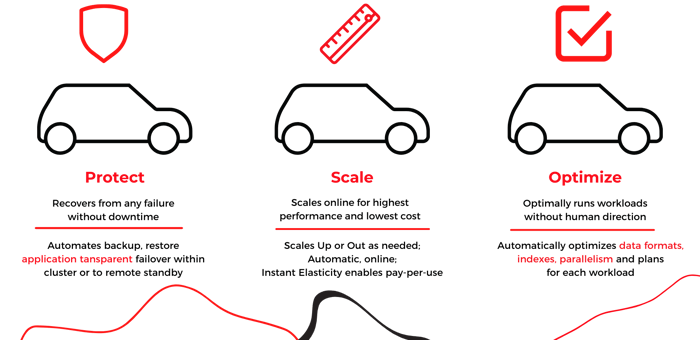
Eliminate human labor
Oracle Autonomous Database eliminates human work for database management activities such as provisioning, protecting, monitoring, tuning, and troubleshooting databases. This results in reduced costs and saved human labor, which JD Edwards customers can leverage to accelerate innovation in their core business areas.
Increased system availability
Theautonomous database automatically recovers from any failures at the data center or server level. Continuously updates the database, operating system, virtual machine, clusterware, hypervisor, or firmware without application downtime. With zero application downtime, Autonomous Database offers JD Edwards customers increased system availability and business continuity, eliminating any impact on business operations.
Reduced risk
Theautonomous database protects against vulnerabilities by applying security, operating system, and database patches every quarter. Patches are applied continuously to nodes in the database cluster, ensuring zero application downtime. This ensures that JD Edwards customers are safe from any kind of vulnerability.
Leveraging Oracle’s Future Innovation
Theautonomous database with its advanced capabilities is a perfect tool for JD Edwards customers to take advantage of and benefit from Oracle’s future innovation. By adopting Oracle Autonomous Database, JD Edwards customers are establishing a strong foundation to leverage any future Oracle-driven innovations that bring them significant business benefits.
Minimum requirements to use Oracle Autonomous Database with JD Edwards.
- Must be on JD Edwards Application Release 9.2
- It is necessary to be at least on Tools Realase 9.2.4.3: Here are other posts where he explains the benefits of being in these Tools Releases and how to upgrade Tools Release without affecting your current Production while in OCI.
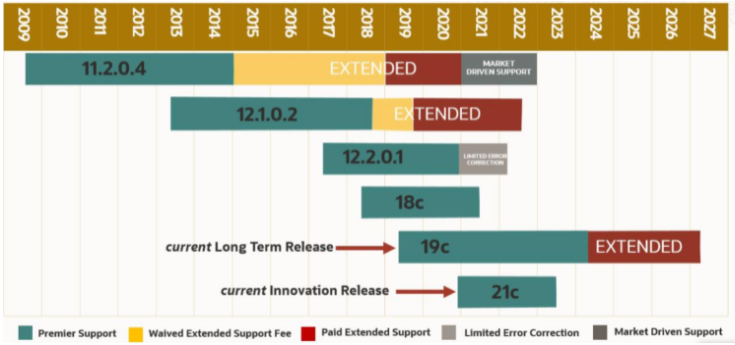
Oracle Autonomous Database 19c Dedicated Exadata Infrastructure (19.7 DBRU and above)
- Use Oracle Linux 7 as the Minimum Operating System
- Using Oracle Weblogic Server 12.2.1.4