

One of the Accounting Books whose keeping is mandatory is the Daily Book. It consists of the accounting record of the company’s operations in chronological order, either day by day or grouped by monthly or quarterly periods.
In this blog, we explain this process at JD Edwards, and how to automate it thanks to a Neteris integration, highlighting the three seats that this process covers, so you save time and resources.
Current Commercial Regulations on the Journal
The regulations indicate that it must be legalized in the Mercantile Registry within four months of the end of the financial year. For financial years that coincide with the calendar year, the period would end in April. JD Edwards, in its standard version, does not reflect in the accounting the opening and year-end entries that must be included in the Journal Book, so in the event of an audit we would not have such entries.
JD Edwards offers us the possibility of consulting the information through a location report, but without generating the entries. This report R74S490 “General journal by object account or category code–Spain” allows you to obtain the following information:
- In summary form (per account)
- Detailed (transaction-to-transaction)
- By object and auxiliary account
- By the category code in which we have the alternative account catalog
One way for users of the JD Edwards Accounting Module to address this is through the use of assignments, so that:
- An assignment closes P accounts
- Other assignment that derecognizes the Balance Sheet accounts
- The last allocation that registers the Balance sheet accounts as the opening balance of the following year
Process automation
To automate this process and in order to cover this requirement in the event of an audit, at Neteris we have developed a report that generates the entries of:
- Regularization
- Closing
- Openness
And it lists them in CSV format, providing a solution to one of the usual demands in this regard, and this without impacting the actual accounting, since it is carried out in an alternative book to the main one (AA).
**Does not impact actual accounting, an alternative ledger is used**
Generation of the entries
1. Regularization Entry
The regularization entry determines the Profit or Loss for the Year (Profit or Loss) by the difference between income and expenses.


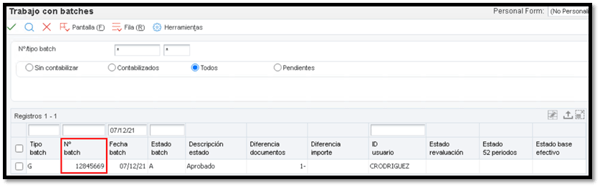
From the Journal Review screen we check the batch and the corresponding entry.
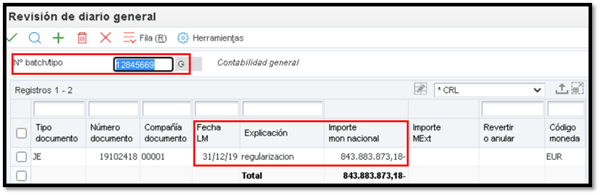
As we can see in the “LM Type” field, this entry is recorded in a book other than AA.
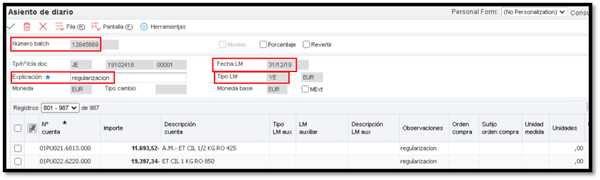
2. Closing Seat
The closing entry cancels the balance sheet items.

If there is an error, the report will warn us that the entry is out of square by means of a message: “Closing Entry does not have a resulting amount equal to 0″.

3. Opening Seat
The closing entry of the previous year is reversed.
We will have these entries available in the Journal Review by filtering by the type of book used for this purpose.
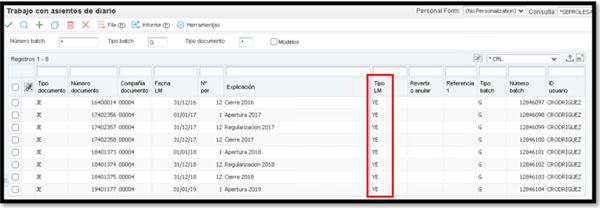
Additionally, we can upload the file in Excel so that it makes it easier for us to work with the information.
By filtering by the Entry type column, we can select the operations of the Opening, Journal, Regularization or Closing entry as we wish.

