

Continuing with the articles about the new features of Tools 9.2, and more particularly from the entry “Application Interface Services. The digital integrator of JD Edwards”, we are going to talk about Orchestrator Studio.
But what is Orchestrator Studio?
Orchestrator is an integral IoT web application that, using AIS as a base, transforms external data into actionable business processes by JD Edwards. We will be able to automate costly tasks, both in time and management, use it as an interface between IoT devices and JDE applications, as a notification engine, as well as an integration platform for external services
For the installation of the Orchestrator we will need an AIS server that will use the functions of the REST services allowing us to access JDE screens and data, and that in turn will be connected to an HTML E1 server. The Orchestrator will process the orchestrations stored in the AIS server. We will also need a weblogic server with ADF runtime.
Key Components of an Orchestration
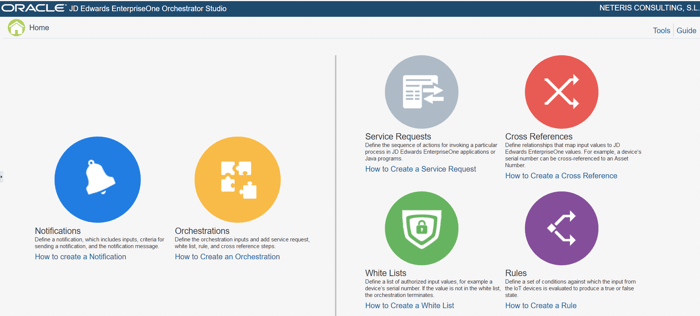
- Service requests: Actions required to invoke a process in JDE applications or JAVA programs
- Notifications: We can define automatic warnings with customized messages depending on the inputs and criteria we need.
- Orchestrations: We will define the orchestration by being able to use service requests, notifications, even whitelists, rules and cross-references.
- Cross references: From here we can define relationships that assign input values on JDE screens. For example, we can relate a serial number of a device with a JDE Asset number.
- White Lists: We will be able to define certain authorized values for the Orchestrator. For example, if a serial number of a device is in it, it can continue with the orchestration, if not, it will end.
- Rules: A set of conditions that will evaluate device input and return true or false statuses.
Due to the recent addition of Orchestrator to the JD Edwards tools, it is constantly evolving, adding several features in each new version, of which we are going to highlight the main ones:
Orch 7.2.x, Tools Release 9.2.3.3+, WLS 12.2.1.3:
OpenAP I: Support for OpenAPI specification
Improved control of orchestration outputs.
XML: Support for XML input and output
Required Entries for Orchestrations: You can now force data entries into required orchestrations.
Orch 7.1.x, Tools Release 9.2.3.2+, WLS 12.2.1.3:
Multiple actions in messages.
Multiple JWT certificates
Orchestration variables.
Date filtering for data requests (e.g. ‘today +/- 7’).
Orch 7.0.x, Tools Release 9.2.3+, WLS 12.2.1.3:
Orchestrator Monitoring
Extended Data Import Format – CSV
Orch 6.1.x, Tools Release 9.2.2.4+, WLS 12.2.1.3:
REST connection to transfer files using FTP
Ability to create Service Request reports
Recorder: Allows us to record the steps we take on any JDE screen to create a Form Service Request.
Errors and Exceptions: Improvements in their visibility.
Orch 6.0.2, Tools Release 9.2.2.x, WLS 12.2.1.0, 12.2.1.1, 12.2.1.2:
Notifications and schedules:from this you can create notifications to notify a user by e-mail or “work center” of events collected in an Orchestration.
Connections to other orchestrations. Control over orchestration output: Allows third-party systems to use orchestration response more easily.
Database connector: now we can create a connector to a non-JDE database to be able to read and write.
Watchlist Service request: We can add data in the Watchlist Orchestration.
Orch 5.1.x, Tools Release 9.2.1.4+, WLS 12.2.1:
External connectors: Connectors can be configured to call external services.
Java groovy scripting.
Orch 5.0.x, Tools Release 9.2.1.2+, WLS 12.2.1:
Since this version, already discontinued, the ADF server is registered in Server Manager and all the components can be installed using it, facilitating management. “Data Request” service: It allows us to retrieve data from JDE tables and views, and make use of them.