

In this blog, we’ll discuss implementing the automatic serialized object generation (or pregeneration) feature in Oracle JD Edwards EnterpriseOne. This feature is available in version 9.2.6 and later.
Before using an object that has been deployed, it is necessary to generate the JD Edwards EnterpriseOne specifications in Java code to access applications in HTML through HTML/JAS web instances. Forms and applications are serialized Java objects, stored in a database (tables of serialized objects F989998 and F989999) and retrieved at runtime.
Automatic generation of serialized objects is optional. If this feature is not enabled, objects will be generated on demand, when accessed by a user. By enabling it, you can specify the objects that will be automatically generated.
The Importance of Serialized Objects in Oracle JD Edwards EnterpriseOne
Serialized objects play a crucial role in optimizing the performance and efficiency of enterprise applications. When working with HTML-based applications and HTML/JAS web servers, transforming JD Edwards EnterpriseOne specifications into Java code and then storing them as serialized objects becomes essential.
Tables F989998 and F989999 in Full Packages
In every deployment of a Full Package in JDE, two crucial tables, F989998 and F989999, come into play. These tables are responsible for storing vital information about the serialized objects generated during the deployment process.
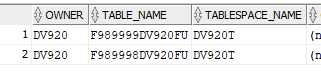
F989998: Serialized Objects Master (Objetos Serializados Maestros)
This table acts as a central master that records all serialized objects generated in the system. It contains detailed information about:
- The relationship between objects
- Its generation status
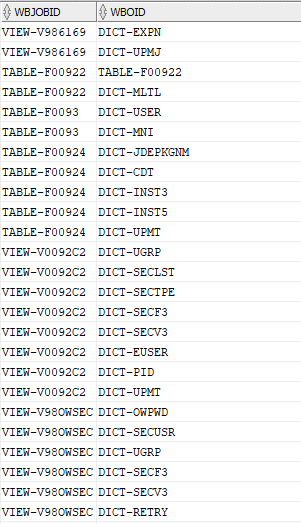
F989999: Serialized Objects Detail (Detalle de Objetos Serializados)
Complementing the master table, F989999 stores details specific to each serialized object. This includes:
- Version Information
- Generation Date
- Other essential attributes
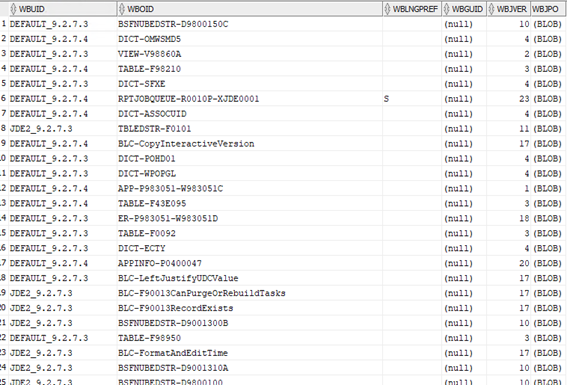
Not only do these tables offer a comprehensive view of the serialized objects generated, but they also make it easy to efficiently track and manage changes in applications. Each time a “full” package is deployed, these tables are updated to reflect the new serialized objects, providing a solid foundation for automatic generation and optimal system performance.
In summary, the automatic generation of serialized objects and the proper management of F989998 and F989999 tables are critical elements to ensure a smooth operation of applications in Oracle JD Edwards EnterpriseOne, providing users with an efficient and seamless experience.
Item Generation
If we enable auto-generation, and don’t specify objects, the following will be generated:
- All objects that are not yet generated (based on entries in the serialized object tables).
- New or modified items in complete or upgrade packages.
- All objects related to a new version of the tools.
Optionally, instead of generating objects as mentioned above, objects can be specifically listed in the following categories:
- Applications
- Reports
- NER Objects
- Business View
- Tables
- Data Dictionaries
Implementing Automatic Specification Generation in Oracle JD Edwards EnterpriseOne
To enable automatic spec generation, we’ll follow these steps:
- In Server Manager, select the HTML/JAS server instance that you want to configure for automatic serialized object generation. If there are multiple HTML instances for the same pathcode, and you enable auto-generation on all instances, only one of them will perform the generation.
- Access Configuration -> Advanced -> Miscellaneous -> Automatic Spec Generation & Package Discovery Override Settings.
- We complete the following fields:
- Automatic Spec Generation: true (enables automatic generation of serialized objects). Max Thread Pool Size: 10 (defines number of threads to generate serialized objects simultaneously). Application To Generate: We write the applications that we want to generate automatically. With “*” it will generate all of them. Reports To Generate: Same as the previous case, but for “reports”. NERs To Generate: In this case for “NER” objects. Business Views To Generate: BSVWs to generate. Tables To Generate: Tables. Data Dictionaries To Generate: and Data Dictionary. Override Package Discovery Server: Normally, we will leave it as “DEFAULT” unless we want a specific Enterprise server to do it, in which case we will enter the IP or name of the server. Override Package Discovery Port: We will only change this port if we modify the previous field.
- Click on “Apply”.
Here we can see an example of the configuration:
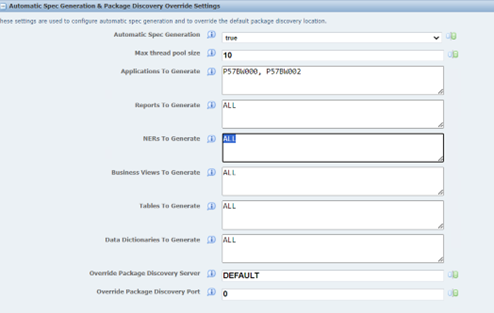
When auto-generation is enabled, the process is executed by a “Full” package deployment or an update package with at least one object included, or by restarting the HTML instance.
The system performs the following steps:
- Look for new records in table F98826 where we find information about deployed packages.
- If it finds logs, it starts the package discovery process on the HTML server.
- Performs automatic generation of serialized objects.
In the HTML server’s e1root.log file, you’ll see messages indicating that auto-generation has begun:


With this process we will be able to avoid unnecessary waits for users after deploying a full package or with many objects.