

In our many years of experience with customers from a wide range of industries and sizes, there is one thing in common with all of them: whatever their business management software, the finance department cannot do without Excel.
Sometimes, for example, the finance department needs to distribute costs using a rational basis of allocation, in order to optimally perform its cost analysis, and this can be done with a little-known solution from JD Edwards: the “Allocations”.
This tool will allow us to automate quite a few financial entries and, therefore, save a few hours and even days of preparing Excel templates, manual entries, etc.
Allocations are used to:
- Distribute expenses
- Create quotes
- Calculate currency conversions
JD Edwards offers three allocation methodologies to meet different needs:
- Recurring Entries: Create a recurring journal entry for an entry that repeats periodically.
- Indexed allocations: Create an indexed allocation to allocate amounts from one company or business unit to another or to create annual or monthly budgets.
- Advanced variable numerator allocations: Create advanced variable numerator mappings to allocate amounts based on different variables, such as category codes or business unit types. Using the advanced variable numerator assignments method requires additional configuration to handle complex, yet dynamic functionality.
*TIP for advanced users: All of them will use the document type “JA” and batch type “D”
The steps to create them are similar in the three methodologies:

Once the Allocations have been created, they can be reviewed and modified, before launching the report. In addition, we will also find a test mode in the report, with the aim of reviewing the entries that are going to be automatically accounted for beforehand.
When configuring them, you can also choose different periodicity, to adapt to the needs of your business.
Indexed Allocations
At this point we will see some practical cases, as well as how to configure them in JD Edwards:
Indexed allocations are used to redistribute:
- Amounts from one or more accounts to another account
- Bead Series
- General Ledger
- Period between business units
- Range of business units of a company
Indexed allocations are the most flexible and widely used allocation method because of their copy function. For example, you can copy this year’s actual amounts to the following year’s budget. You can also use indexed allocations for these purposes:
- To distribute costs categorized as overhead among business units or companies in your organization.
- Allocate expenses from one company to another.
- Multiply by a positive or negative factor before assigning.
- Take actual amounts, multiply them by a certain percentage, and assign them to the budget book.
- Assign a budget amount to another account.
- Set annual or monthly budgets.
- Zeroing of accounts.
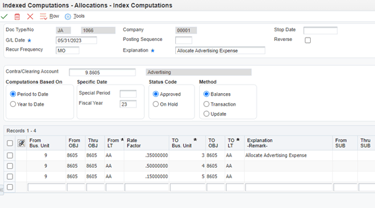
In the configuration we will indicate from where to where, which multiplier we will use or the periodicity. In addition, we have three methods within the indexed ones :
- Balances: Balances that are created from the final balance of the account.
- Transaction: A transaction created by each transaction in each account. It is not usually used due to the large number of records that could be created, although it can be considered for accounts that do not have too many lines.
- Update: Updates the balance of books other than “AA”, they do not create transactions, they are only updated in the balance table.
*Note: for annual budgets the “balance” method is used, entries will not be created either, only balances are updated.
Redistribution of expenses by business unit (real example)
We present you a small DEMO where we explain how to configure and see the final result of an indexed allocation.