
SAP Business ByDesign allows you to adapt the presentation of the documents generated by the ERP to the needs of each company. Invoices, orders, offers, contracts, delivery notes or confirmations can use different templates depending on the language, country, company, organizational unit or type of document.
This capability is especially relevant when a company needs documents generated from its ERP to maintain its corporate identity, incorporate additional information, or respond to market-specific requirements.
SAP Business ByDesign provides standard templates that can be used as a starting point and offers different mechanisms to adapt them. These include Easy Form Editor and Adobe LiveCycle Designer, as well as variant, version, and master template management capabilities available from within the system itself.
In this article, we review how template customization works in SAP Business ByDesign, what differences exist between the main tools, and in which situations each one should be used.
What are form templates in SAP Business ByDesign?
Form templates determine the content and layout of the documents that SAP Business ByDesign generates as output from business processes.
For example, a company can use templates for documents such as:
- Commercial offers.
- Order confirmations.
- Purchase orders.
- Invoices.
- Subscriptions.
- Contracts.
- Delivery notes and notices.
- Service confirmations.
- Documents related to payments and balances.
SAP provides standard templates for these documents, and depending on the country/region and the language you configure, different variants may exist. SAP’s own documentation includes, among other things, specific forms for sales, purchasing, logistics, and payments.
This makes it possible to start from a ready-made base and then adapt it to the specific needs of the organization.
Why customize SAP Business ByDesign templates?
Form customization is not just about aesthetics.
In many ERP projects, the documents that leave the system are part of the direct relationship with customers, suppliers and other stakeholders. Therefore, they must combine business information, legal requirements and a presentation consistent with the corporate identity.
Among the main reasons to customize SAP Business ByDesign templates are:
Adapt the corporate identity
It is possible to adapt elements such as logos, headers, footers, sender address or certain corporate texts.
Master templates allow you to centralize some of these elements for consistent use in different documents. SAP uses them to define, among other things, header, footer, logo, and sender address.
Incorporate additional information
A template may need new fields or information that does not appear in the standard layout.
For example:
- Additional Customer Data.
- Logistical information.
- Internal references.
- Trading conditions.
- Tax information.
- Expansion fields.
- Specific texts for certain documents.
Adapt documents to different countries
A company’s needs can vary depending on the market in which it operates.
SAP Business ByDesign includes country/region-specific variants and language-specific variants. This allows different versions of the same template to be available when there are different legal, linguistic or formatting requirements.
Maintain a consistent presentation
When an organization uses different company codes, organizational units, or brands, master templates allow you to establish common elements and prevent each document from having a completely different layout.
Easy Form Editor vs. Adobe LiveCycle Designer
SAP Business ByDesign has different possibilities for adapting the templates. The choice of one or the other will depend on the level of customization required.
Easy Form Editor
Easy Form Editor is aimed at relatively simple modifications to the content of forms.
The tool divides the document into different blocks, including:
- Information blocks, used to display fields.
- Table blocks, which allow you to work with columns, detail lines, and summaries.
- Free text blocks, to incorporate texts or notes.
In addition, it allows you to visualize a preview using sample data.
It is a suitable alternative when the modification needs are simple and do not require advanced control over the structure of the PDF.
Adobe LiveCycle Designer
When customization requires more control over the design and behavior of the form, SAP Business ByDesign allows you to work with Adobe LiveCycle Designer.
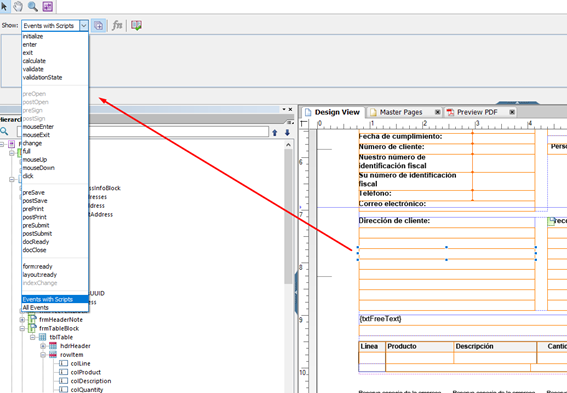
The procedure starts by downloading the template variant from the form template management. The downloaded file contains the template and the data structure needed to work with it. The file can then be opened in Adobe LiveCycle Designer, modified, and reloaded into SAP Business ByDesign.
This alternative offers a much higher level of customization and is especially interesting in projects where forms have complex requirements.
What are the differences between the two options?
The fundamental difference is in the level of control over the form.
| Feature | Easy Form Editor | Adobe LiveCycle Designer |
|---|---|---|
| Easy editing | Yes | Yes |
| Text modification | Yes | Yes |
| Block Management | Yes | Yes |
| Advanced Design Changes | Limited | Yes |
| Advanced Form Customization | Limited | Yes |
| Advanced Data Work | Limited | Yes |
| Form logic and behavior | Limited | Yes |
| Advanced PDF Control | No | Yes |
Therefore, it is not necessarily a matter of choosing one tool or another for all scenarios.
Easy Form Editor can be sufficient for quick and easy changes, while Adobe LiveCycle Designer is more appropriate when the form needs a specific design or behavior.
How to download an SAP Business ByDesign template?
SAP Business ByDesign allows you to download template variants from the Form Template Update view.
The general process is:
- Access Application and User Management or Administrator.
- Enter Business Flexibility.
- Access Updating Form Templates.
- Select the template you want to adapt.
- Download the corresponding variant.
SAP generates a ZIP file that can contain the XDP data package, the XSD schema, and, when available, sample XML data for testing and previewing.
This data is especially useful when working with external design tools, as it allows you to check how the form will behave using information similar to what you will receive in production.
Customizing Fields in Templates
One of the most common needs in customization projects is to incorporate information that does not appear in the standard template.
In these cases, the job is not only to visually modify the document. It is also necessary to have the corresponding data in the information structure that the form receives and to carry out the appropriate mapping.
The flow can be summarized as follows:
Data in SAP Business ByDesign → XML Structure → Form Field → Document Design
Therefore, when additional fields are incorporated, it is important to check both the origin of the data and its availability in the structure used by the form.
Visual personalization without a correct correspondence with the ERP data can cause the field to appear empty or not behave as expected.
Using Master Templates
Another important element in document customization is form master templates.
It aims to centralize common elements that can be used in different documents, such as:
- Logo.
- Header.
- Footnote.
- Return address.
- Certain corporate texts.
- Notices or disclaimers included in certain mailings.
This is especially useful when a company generates many types of documents and needs to maintain a consistent visual identity.
In addition, different master templates can be created when there are multiple company codes, companies, or organizational units that need to use different corporate information.
Template variants: language and country
SAP Business ByDesign allows you to work with different variants of the same template.
This is especially relevant for international companies.
For example, an organization may need to:
- An invoice in Spanish for Spanish customers.
- An invoice in English for international customers.
- A specific format for certain countries.
- A different variant for certain companies.
The system can use the available variants to determine which template should be used based on parameters such as language or country/region.
In this way, the same organization can maintain a consistent document structure without necessarily having to use a single template for all its markets.
Automatic template selection
Customization doesn’t end with design.
It is also necessary to determine when each template should be used.
SAP Business ByDesign has template selection rules that allow you to define which form should be used for a particular combination of document and conditions.
For example, you can set up a rule so that certain orders use a particular template when certain conditions are met.
This allows you to establish scenarios such as:
- Different workforce per company.
- Different template by country.
- Different template per language.
- Specific template for certain processes.
- Alternate template for certain types of documents.
The result is a much more automated document generation aligned with business rules.
Template versioning
Another important aspect is version management.
When you modify a variant of a template, SAP Business ByDesign creates a new version. This version may remain unpublished until it has been reviewed and validated.
Once published, it will be available for productive use.
This mechanism allows the design and testing process to be separated from the final use of the form.
In a real project, it is advisable to always validate:
- Design.
- Data shown.
- Language.
- Format of dates and quantities.
- Tax information.
- Page breaks.
- Tables and detail lines.
- Logos and corporate information.
- Final generation of the PDF.
- Different business scenarios.
Which tool to use to customize a template?
The decision will depend mainly on the complexity of the form.
Easy Form Editor is a good choice when you need simple modifications to the content and basic structure of the document.
Conversely, when your project requires a higher level of customization, design control, advanced data processing, or specific logic within the form, it is more appropriate to work with Adobe LiveCycle Designer.
In both cases, it’s important to note that the workforce is part of a larger business process. It is not enough to modify the PDF: you also have to check how the template is selected, what data it receives, what variant it uses and how it is published.
Best practices for editing SAP Business ByDesign templates
Before modifying a template in production, it is advisable to follow a series of good practices:
1. Always start from a standard template
The templates provided by SAP provide a good basis for making adaptations and reduce the effort required to create a form from scratch.
2. Pre-define requirements
Before starting the design, it is advisable to identify what information should appear, who will use the document and in which scenarios it will be generated.
3. Separate design and data
Visual design and data structure are related, but they should be analyzed separately to avoid mapping issues.
4. Use Test Data
Preview with sample data allows you to detect problems before you release a new version.
5. Review the variants
In international environments, you need to check the different language and country/region combinations.
6. Validate the selection rules
A properly designed template will be of no use if the system continues to select another variant for the corresponding scenario.
7. Control versions
Modifications should be tested before publishing to prevent a change to a form from affecting document generation processes.
SAP Business ByDesign Template Customization with Unikal Tech
Customizing forms in SAP Business ByDesign may initially seem like a purely visual task, but in real projects it involves working with different elements: data structure, variants, selection rules, design, versioning, and publishing.
Therefore, when the documents generated by the ERP have an important weight in the commercial, financial or logistical processes of an organization, it is advisable to approach customization from a functional and technical perspective.
At Unikal Tech we help organizations adapt SAP Business ByDesign to their specific processes and needs, including the customization of forms and documents generated from the ERP.
If you need to adapt your SAP Business ByDesign templates, incorporate additional information or define different formats according to your processes, tell us what you need and we will discuss the best alternative with you.